
VAT on expenses in Keepr
When (and when not) to flag VAT on an expense so you reclaim what you can without inflating what you can't.
If you're VAT-registered, every business purchase where the supplier charges VAT is one you can usually reclaim. In Keepr, you do that by picking your VAT rate from the Tax dropdown on the expense form. Keepr works out the VAT amount, adds it on top of your net figure, and feeds it into the Tax Summary report so you can see how much you can reclaim from HMRC.
Who this guide is for
You're VAT-registered (your business turnover crossed the £90,000 threshold, or you registered voluntarily), and you want to claim back the VAT on your business purchases. This guide assumes you've already added VAT at 20% as a tax rate in Settings → Taxes. If you haven't, read Setting up tax preferences first - it takes about a minute.
When to flag VAT on an expense
Flag VAT on the expense when all three of these are true:
| Check | What it means |
|---|---|
| The receipt shows VAT | There's a separate line for VAT (or a clear VAT total) on the receipt or invoice. |
| The supplier is VAT-registered | Their VAT registration number appears on the receipt. |
| You are VAT-registered | You can only reclaim input VAT if your own business is registered with HMRC. |
If any one of those is missing, leave the Tax dropdown on - No Tax. The gross amount you paid is still a deductible business cost - it'll appear in your Profit & Loss report - you just can't reclaim VAT on it.
How Keepr handles it
- Open the Add Expense form (or edit an existing one) and fill in the usual Title, Category, Date and Amount.
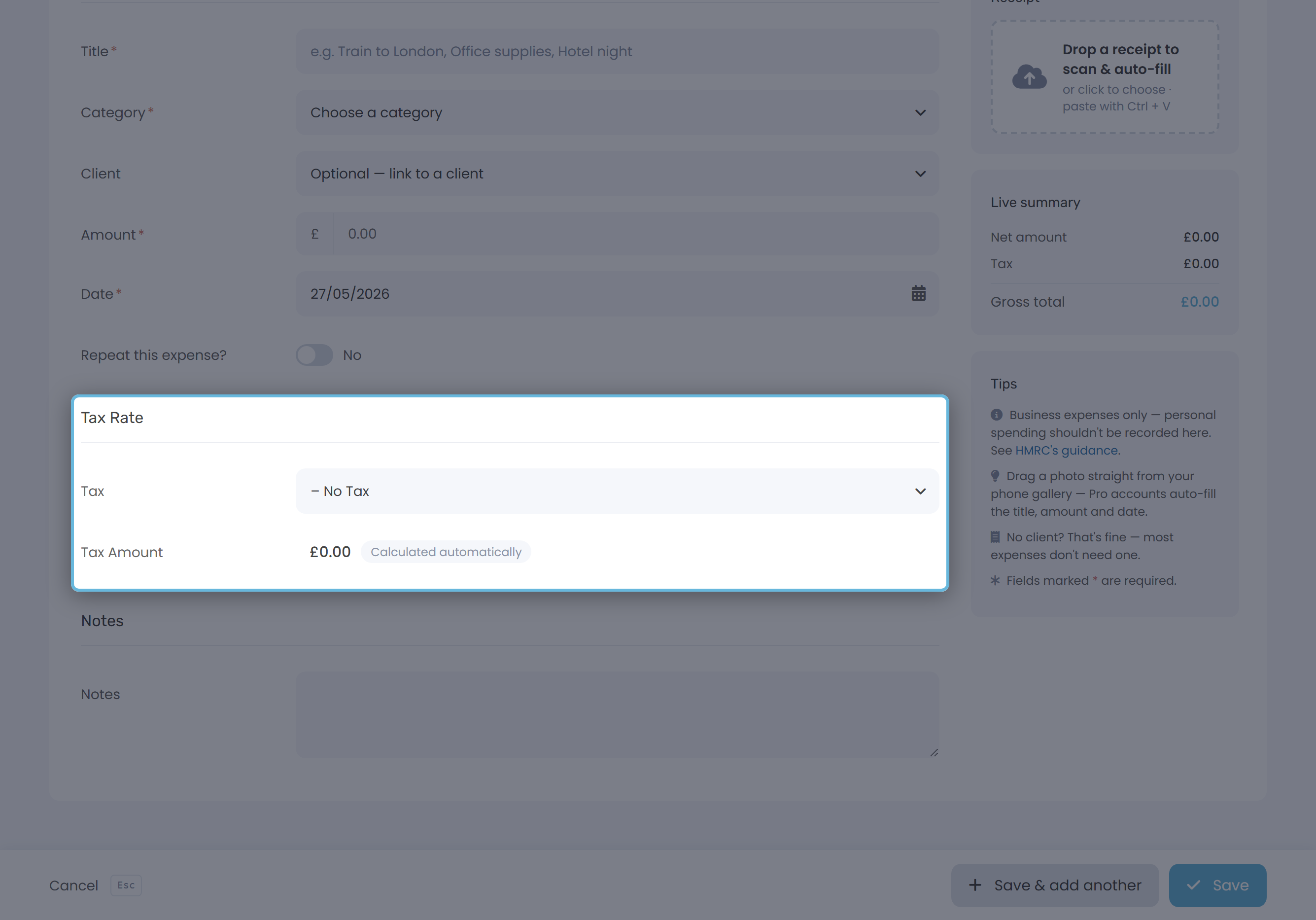
- In the Amount field, enter the net figure - the price before VAT. This is the number Keepr multiplies by your tax rate.
- Scroll to the Tax Rate section and pick your rate from the Tax dropdown - for example VAT - 20%. The options come from the tax codes you saved in Settings.
- Watch the Tax Amount field below the dropdown. It's read-only and Keepr fills it in automatically: net amount × rate.
- Glance at the Live summary card on the right. It shows your Net amount, Tax and Gross total in real time, so you can sense-check the numbers against your receipt before saving.
net + tax = gross. You enter the net, Keepr adds the tax, the summary shows the gross. This is the opposite of how Other Income works (which extracts tax from the gross), so always check which figure your receipt is showing before you type it in.Worked example
You buy a £60 software subscription. The supplier is VAT-registered and the invoice shows £50 net plus £10 VAT.
| Field | Value |
|---|---|
| Title | Software subscription |
| Category | Office Expenses → Software |
| Amount | £50.00 (net) |
| Tax | VAT - 20% |
| Tax Amount (auto) | £10.00 |
| Live summary → Gross total | £60.00 |
Hit Save. That £10 of input VAT is now sitting in Keepr ready to net off against the VAT you've collected on invoices.
Where the VAT shows up
Open the Tax Summary report and pick the period that covers your expense date. You'll see a block for each tax code you've used:
| Row in the VAT block | What it shows |
|---|---|
| Collected | VAT you've charged on invoices in the period. |
| Less Expenses | VAT you've paid on expenses in the period - the input VAT you can reclaim. |
| Net | Collected minus Less Expenses. Positive = the VAT you owe HMRC. Negative = HMRC owes you a refund. |
When NOT to flag VAT
Plenty of business expenses won't have VAT to reclaim. Here are the common cases where you should leave the Tax dropdown on - No Tax:
| Situation | Why |
|---|---|
| You're not VAT-registered | Only registered businesses can reclaim input VAT. Record the full gross you paid in the Amount field. |
| The receipt doesn't show VAT separately | Cash receipts under £250 sometimes don't itemise VAT. If you can't see a VAT line and no VAT number, treat it as no-tax. |
| Zero-rated items | Most food, books, children's clothes - the supplier didn't charge VAT, so there's nothing to reclaim. |
| Exempt items | Insurance premiums, postage stamps, some financial services - VAT doesn't apply. |
| Supplier isn't VAT-registered | Many sole traders trade below the £90k threshold and don't charge VAT. No VAT, nothing to reclaim. |
| Partly personal | Keepr doesn't split an expense net into business + personal. Log only the business portion as the expense and leave VAT off (or split it across two expense records). |
Reduced and zero rates
If you regularly buy reduced-rate (5%) items - domestic energy at your home office, for example - add a second tax code called Reduced VAT at 5% in Settings → Taxes. It appears in the same Tax dropdown alongside your 20% VAT, and the Tax Summary report shows a separate block for each rate.