
Reading your Tax estimate in Keepr
What every number on the Summary page Tax Estimate card means, how Keepr works it out, and what it's not telling you.
The Tax Estimate card on the Summary page is Keepr's live answer to how much will I owe HMRC this year?. It updates every time you raise an invoice or log an expense, and it uses HMRC's published bands and rates rather than rough rules of thumb. This guide walks through every figure on the card and explains how Keepr arrives at it.
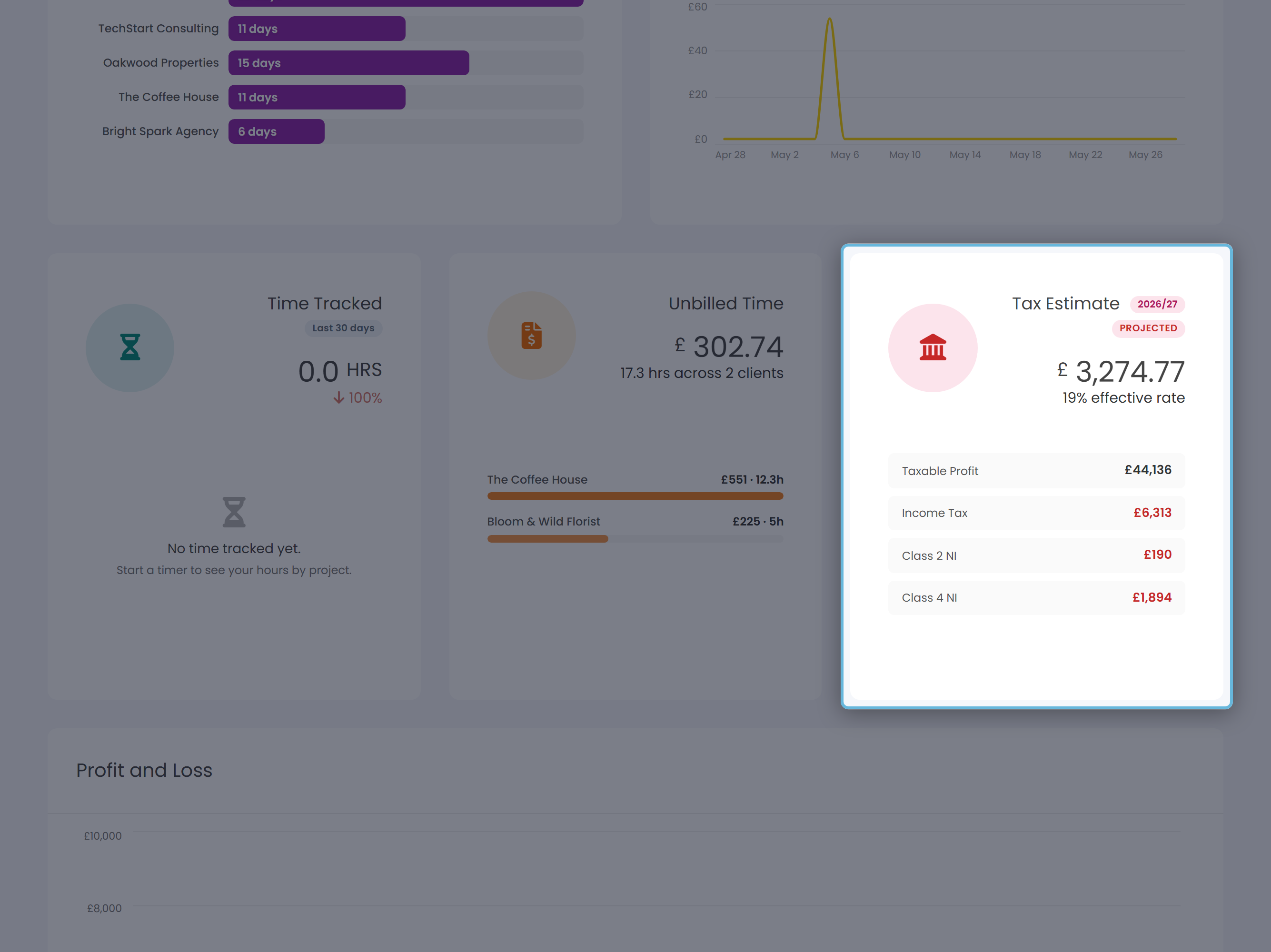
The big number
The large figure on the card is the total estimated tax for the current tax year (sole traders) or the current accounting period (limited companies). Underneath it sits an effective rate - the percentage of your total income that ends up going to HMRC once allowances and bands have done their work.
The pill next to the title shows the tax year, for example 2025/26. Sole traders also see a PROJECTED tag when Keepr has annualised your year-to-date profit to estimate the full-year figure (see Why it says ‘Projected’ below).
Sole traders - what each line means
The mini-chart shows up to five rows. Tax charges are in red; PAYE already paid (a credit) is in green.
| Line | What it is |
|---|---|
| Taxable Profit | Your income minus expenses for the tax year so far - the figure HMRC actually taxes. Shown when there's room. |
| Income Tax | Tax on your profit (plus any employment / savings / dividend income you've entered), stepped through HMRC's 20% / 40% / 45% bands. |
| Class 2 NI | Usually £0. Class 2 stopped being payable on 6 April 2024: if your profits are above the Small Profits Threshold the year still counts towards your State Pension without you paying anything. Below that threshold you can choose to pay it voluntarily, and only then does a figure appear here. |
| Class 4 NI | Percentage-based National Insurance: 6% of profit between £12,570 and £50,270, then 2% on anything above £50,270. |
| Student Loan | Shown only if you've told Keepr which plan you're on (Plan 1, 2, 4, 5 or Postgraduate). 9% of income above the plan's threshold; 6% for Postgraduate. |
| Less: PAYE paid | A credit for tax your employer already took off your salary. Shown only if you've recorded employment income and the tax paid on it. |
Sole traders - the full breakdown
Click anywhere on the card to open the Tax Estimate breakdown. The modal walks through the same maths HMRC would, in five sections: Income, Allowances, Tax bands, National Insurance & Student Loan, and Adjustments.
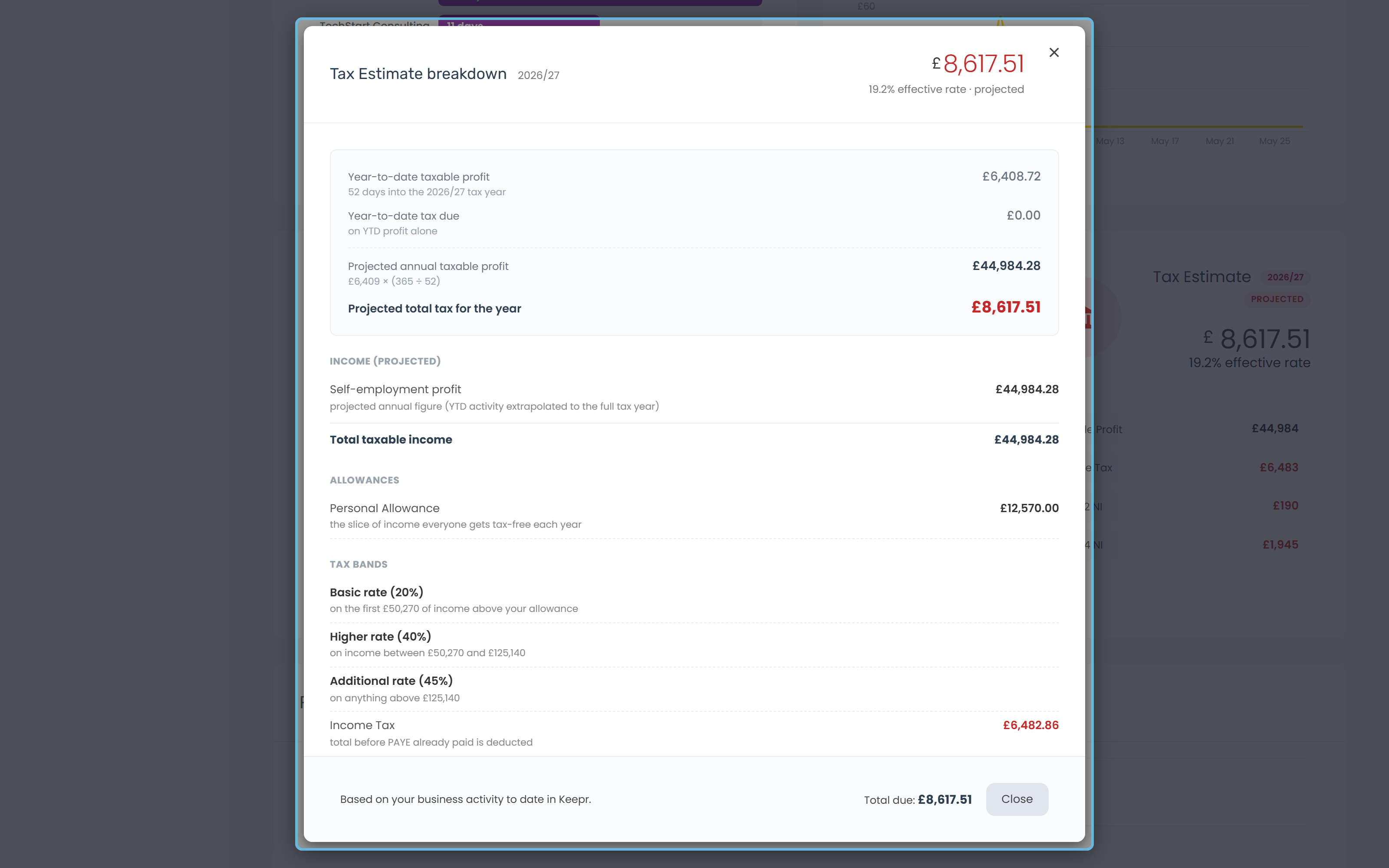
Personal Allowance
The slice of income everyone gets tax-free each year - £12,570 for 2025/26 and 2026/27. Two things can change yours:
| Adjustment | Effect |
|---|---|
| £100k taper | If your total income is over £100,000, you lose £1 of Personal Allowance for every £2 above. It disappears entirely at £125,140. |
| Marriage Allowance | If your spouse has transferred theirs to you, you get an extra £1,260. If you've transferred yours to your spouse, your allowance drops by £1,260. |
Tax bands (Income Tax)
| Band | Rate | On the slice of income… |
|---|---|---|
| Basic rate | 20% | up to £50,270 |
| Higher rate | 40% | between £50,270 and £125,140 |
| Additional rate | 45% | above £125,140 |
Keepr stacks income in HMRC's prescribed order: self-employment profit and PAYE first, then savings interest, then dividends. Each layer uses any unused Personal Allowance from the layer above it.
Savings and dividends
If you've entered savings interest or dividends in your tax options, the modal also accounts for:
| Allowance | How much |
|---|---|
| Personal Savings Allowance | £1,000 tax-free interest if you're a basic-rate taxpayer, £500 if higher-rate, nothing if additional-rate. |
| Starting Rate Band | Up to £5,000 of savings interest at 0% - but only if your other income is below your Personal Allowance, then tapered away. |
| Dividend Allowance | First £500 of dividends taxed at 0% regardless of your band. |
Pension and Gift Aid relief
Personal pension contributions and Gift Aid donations both push the basic-rate threshold up by their gross amount (your contribution × 1.25), so a slice of income that would have been taxed at 40% drops back to 20%. If you've entered either figure in your tax options, you'll see a Pension & Gift Aid relief line in the Allowances section.
Why it says ‘Projected’
If a PROJECTED tag is showing in the card title, Keepr is estimating your full-year tax based on your year-to-date profit, scaled up to a year:
The modal shows both figures: your year-to-date profit and tax (the legally-accurate number for what you've earned so far) and the projected full-year figure (the headline on the card). Only your self-employment profit is projected. Manually entered annual figures - employment, savings, dividends, pension contributions, Gift Aid - stay as you typed them.
Limited companies - Corporation Tax
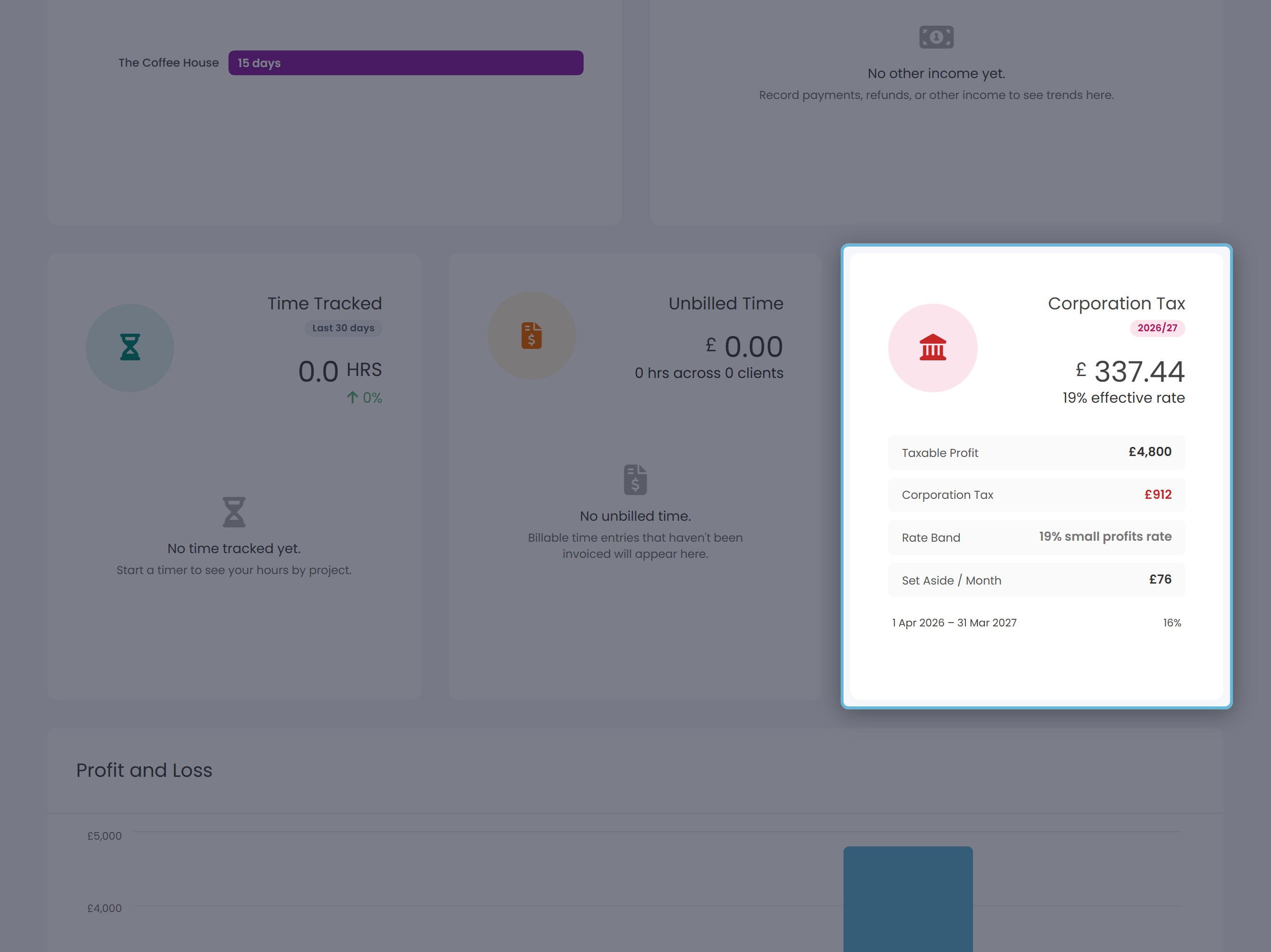
If your Business Type is Limited company, the card title changes to Corporation Tax and the chart shows four lines instead:
| Line | What it shows |
|---|---|
| Taxable Profit | Income minus expenses for the accounting period so far. |
| Corporation Tax | Your estimated CT bill for the full accounting period. |
| Rate Band | Which of HMRC's three CT bands applies to you. |
| Set Aside / Month | Total CT ÷ 12 - a suggested monthly transfer into a tax-savings pot so the cash is there on the due date. |
The three Corporation Tax bands
| Band | Rate | When it applies |
|---|---|---|
| Small profits rate | 19% | Profits up to £50,000. |
| Main rate | 25% | Profits of £250,000 or more. |
| Marginal relief | ~19% → 25% sliding | Profits between £50,000 and £250,000. |
Your accounting period is set by the Financial Year End in Settings → Business. The progress bar under the chart shows how far into the period you are.
Worked example - £58,000 taxable profit
To put the maths in context, here's how a freelancer with £58,000 of taxable profit in 2025/26 would be estimated. Both the sole-trader and limited-company versions are shown so you can see the contrast.
Sole trader on £58,000
| Component | Working | Amount |
|---|---|---|
| Personal Allowance | Standard, no taper (well under £100k) | £12,570 |
| Basic rate Income Tax | 20% on £37,700 (£12,570 to £50,270) | £7,540 |
| Higher rate Income Tax | 40% on £7,730 (£50,270 to £58,000) | £3,092 |
| Class 2 NI | Not payable since 6 April 2024 | £0 |
| Class 4 NI | 6% on £37,700, then 2% on £7,730 | £2,417 |
| Total estimated tax | £13,049 |
Effective rate: roughly 22.8% of profit. That's the figure the card shows underneath the headline.
Limited company on £58,000
| Component | Working | Amount |
|---|---|---|
| CT at main rate | £58,000 × 25% | £14,500 |
| Less marginal relief | 0.015 × (£250,000 − £58,000) | −£2,880 |
| Corporation Tax | £11,620 | |
| Set aside per month | £11,620 ÷ 12 | £968 |
Effective rate: roughly 20.0%. Note this is just the company's bill - if you take dividends out, you'll pay personal tax on those too on your own Self Assessment.
What's not factored in
| Not included in the estimate | Where it actually goes |
|---|---|
| Capital gains, property income, foreign income | Filed separately on your Self Assessment return. |
| Marriage Allowance, Student Loan, voluntary Class 2 NI | Only counted if you've enabled them on the Tax page under More tax options. |
| Pension contributions, Gift Aid | Only counted if you've entered the amounts in More tax options. |
| Employment income / PAYE tax | Only counted if you've entered the year totals in More tax options. |
| Director's dividends (limited companies) | Taxed on the director's personal return, not the company's CT. |
How to use the number
| If you want to… | Do this |
|---|---|
| Avoid a January nasty surprise | Set up a savings pot, transfer the Set Aside / Month figure every month, leave it alone until 31 January. |
| Cut the bill | Run more allowable expenses through the business, top up your pension, or look at whether incorporating changes the picture. |
| File the actual return | Sole traders: head to the Tax page for quarterly updates and the final declaration. Limited companies: pass the figures to your accountant or Companies House software. |
| Change the inputs | Edit business details in Settings → Business. Edit Student Loan, Marriage Allowance, pension, Gift Aid, employment and savings figures on the Tax page under More tax options. |